
There is a complete physics laboratory in your pocket. Accelerometer, gyroscope, magnetometer, microphone, barometer, GPS, high-frame-rate camera: a modern smartphone carries more than a dozen scientific-grade sensors — the same MEMS technologies found in aeronautics, the automotive industry and airbags. Doing physics with a smartphone is therefore not an educational gimmick: it puts into every student’s hands a precise, free measuring instrument that they already know inside out.
This guide brings together everything you need to know to turn a smartphone into a physics laboratory: how the sensors work and how accurate they are, landmark experiments, links to school curricula, choosing the right apps, and practical advice for running lessons in class.
📐 Want to know everything your smartphone can measure?
This guide explains how to use a smartphone to teach and learn physics. For a complete catalogue of every physical quantity measurable with a smartphone, see 50 Physics Measures you can do with your smartphone.
🔬 Over 120 free experiments with FizziQ
With the free FizziQ app, developed with the La main à la pâte Foundation, you can immediately carry out more than 120 physics experiments using the smartphone’s sensors: mechanics, acoustics, magnetism, optics, kinematics…
In this guide
- Why use a smartphone in physics?
- How accurate is it? MEMS, calibration and limitations
- The smartphone’s sensors, one by one
- Ten landmark experiments
- Smartphones and school curricula, from primary school to university
- Which apps should you choose?
- Making your classroom sessions a success
- FAQ
Why use a smartphone in physics?
A laboratory that costs zero euros
A traditional laboratory sensor — a data-logging interface, sound level meter, lux meter or wired accelerometer — costs several hundred euros, is bought in one or two units per school, and sits at the back of a cupboard between practical sessions. The smartphone, on the other hand, is already there, in every student’s pocket or in the school’s tablet fleet. This availability changes the very nature of experimental teaching: instead of a demonstration at the teacher’s desk or one sensor shared between pairs, every student has their own instrument. Measurement becomes individual, repeatable and comparable — three essential conditions for talking seriously about uncertainty and reproducibility.
Smartphone vs traditional data-logging equipment: the comparison
| Function | Smartphone | Traditional data-logging equipment |
|---|---|---|
| Acceleration (3 axes) | ✓ | ✓ |
| Rotation (gyroscope) | ✓ | rarely |
| Sound (level, frequency, spectrum) | ✓ | ✓ |
| Emission of calibrated sounds | ✓ | ✗ (separate signal generator) |
| Magnetic field | ✓ | ✓ (dedicated probe) |
| Atmospheric pressure | ✓ (depending on model) | ✓ |
| Light (illuminance, colour) | ✓ | ✓ |
| GPS / field measurements | ✓ | ✗ |
| Camera / video analysis | ✓ | sometimes |
| Temperature, pH, voltage | ✗ (external sensor required) | ✓ |
| Number of instruments per class | 1 per student | 1 to 8 per room |
| Cost per workstation | €0 | €300 to €1,500 (depending on sensors) |
The smartphone doesn’t replace everything — we detail its limitations below — but it covers, for free, the essentials of mechanics, acoustics, magnetism and photometry, while adding two capabilities that data-logging systems lack: mobility and video analysis.
Measurement leaves the laboratory
The smartphone frees physics from the four walls of the lab. You can measure acceleration in a lift or on a fairground ride, the sound level in the canteen, atmospheric pressure in the stairwell, a cyclist’s speed with GPS, the magnetic field near a tram line. Physics becomes again what it fundamentally is: a science of the real world, not just of lab benches.
A natural vehicle for inquiry-based learning
Finally — and this is perhaps the most important point — the smartphone puts the student back in the position of a researcher. They formulate a hypothesis, design a protocol, choose their instrument, measure, analyse, critique their results and draw conclusions. This inquiry-based approach, at the heart of school curricula, finds its ideal tool in the smartphone, as we explain in The smartphone: the ideal instrument for scientific inquiry.
How accurate is it? MEMS, calibration and sensor limitations
Two families of sensors, one shared driver: miniaturisation
Contrary to popular belief, a smartphone’s sensors are not toys. They belong to two major technological families.
The first is MEMS (Micro-Electro-Mechanical Systems): sensors containing a genuine moving mechanical microstructure, etched in silicon at the micron scale. The accelerometer is the archetype — a mass suspended on microscopic springs moves under inertial forces, and the resulting change in electrical capacitance is converted into acceleration. The gyroscope exploits the Coriolis force acting on a vibrating mass — the same principle as the balance organs of insects. The barometer measures the deformation of a membrane, and the microphone is itself a MEMS device, with its miniature vibrating membrane.
The second family is microelectronics with no moving parts: the camera sensor is an array of CMOS photodiodes, heir to Moore’s law; the GPS receiver is a radio-frequency chip; the magnetometer relies on the Hall effect. No mechanics, only solid-state physics.
What unites these two families is the economic engine: produced by the billions every year for phones, connected devices, cars (airbags, stability control) and drones, these components have seen their size and price collapse — a camera sensor that cost hundreds of euros in a 1990s scientific camera now costs just a few. It is this economy of scale, as much as the technology itself, that puts a laboratory in every pocket. And the performance is remarkable:
- accelerometer: sampling at 100 Hz or more, resolution on the order of a hundredth of a m/s², i.e. a measurement of g to better than 1%;
- microphone: digitisation at 44,100 Hz (CD audio sampling rate), frequency measurement to within a hertz across the entire audible spectrum;
- magnetometer: sensitivity of a few tenths of a microtesla, against an Earth field of roughly 47 µT;
- camera: 60, 120 or even 240 frames per second in slow-motion mode, i.e. a time resolution of 4 ms;
- barometer: sensitive enough to detect one metre of elevation change.
Studies published in the American Journal of Physics and The Physics Teacher have validated these sensors for dozens of university-level practicals.
Calibration: raw data vs processed data
An essential nuance to teach: the smartphone almost never delivers the sensor’s raw data. The magnetometer is constantly recalibrated by the operating system (which is why the compass resists magnets), the accelerometer is factory-corrected, and the microphone sometimes applies noise reduction. Understanding what separates the physical signal from the displayed value is a learning objective in itself.
What a smartphone cannot measure
Honest content is better than sales talk: the smartphone has clear limitations.
- Temperature: the phone has internal probes, but they measure the temperature of its battery and processor, not that of the air or a liquid.
- Electrical voltage and current: no sensor gives access to them; electricity remains the domain of the multimeter.
- pH and solution chemistry: apart from indirect colorimetry, there is no direct chemical measurement.
- Radioactivity: despite apps that claim to measure it using the camera sensor, the measurement is neither reliable nor quantitative.
- Certified absolute sound level: a phone’s sound level meter is not calibrated like a Class 1 instrument; it is excellent for comparisons, approximate in absolute terms.
- Metrology-grade precision: GPS drifts indoors, and the clock is not an atomic clock.
For all of these quantities, the solution is an external sensor connected to the phone or tablet via Bluetooth — this is exactly the role of FizziQ Connect, which adds temperature, air quality, voltage and fifteen or so other measurements to the smartphone’s toolkit.
A second, even more open route is to link the phone via Bluetooth to a microcontroller — micro:bit, Arduino or ESP32. These boards accept a wide variety of sensors, often costing just a few euros, and can be programmed in class. The smartphone then becomes the display, the recorder and the lab notebook of a setup built entirely by the students — a natural gateway to cross-disciplinary projects and technology teaching.
The smartphone’s sensors, one by one
 More than ten scientific sensors live together within a few square centimetres.
This section introduces the main sensors used in physics experiments. For a complete description of every measurable quantity, measurement range, unit and instrument available on a smartphone, see 50 Physics Measures you can do with your smartphone.
The accelerometer: the Swiss Army knife of mechanics
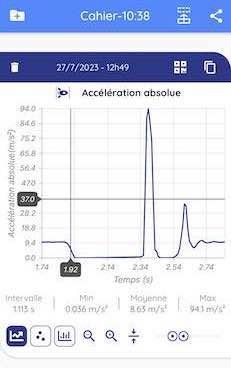 During the fall, the absolute acceleration drops to zero: this is weightlessness.
This is the king of mechanics sensors: studying the oscillations of a pendulum or a mass-spring system, measuring the acceleration of a lift, a tram or a car, analysing an impact or a jump, demonstrating weightlessness in free fall.
One subtlety every teacher should master: the phone provides two distinct quantities. The absolute acceleration includes the reaction to gravity — a phone lying on a table reads 9.81 m/s². The linear acceleration subtracts it computationally — the same phone reads zero. In free fall, the absolute acceleration drops to zero (the sensor no longer “feels” anything: weightlessness) while the linear acceleration reads g. This distinction, a source of rich discussions about reference frames, is explained in What is the difference between linear and absolute acceleration? and in How does my smartphone’s accelerometer work?
Discover every measurement available with the accelerometer in 50 Physics Measures you can do with your smartphone.
The gyroscope: rotation and angular momentum
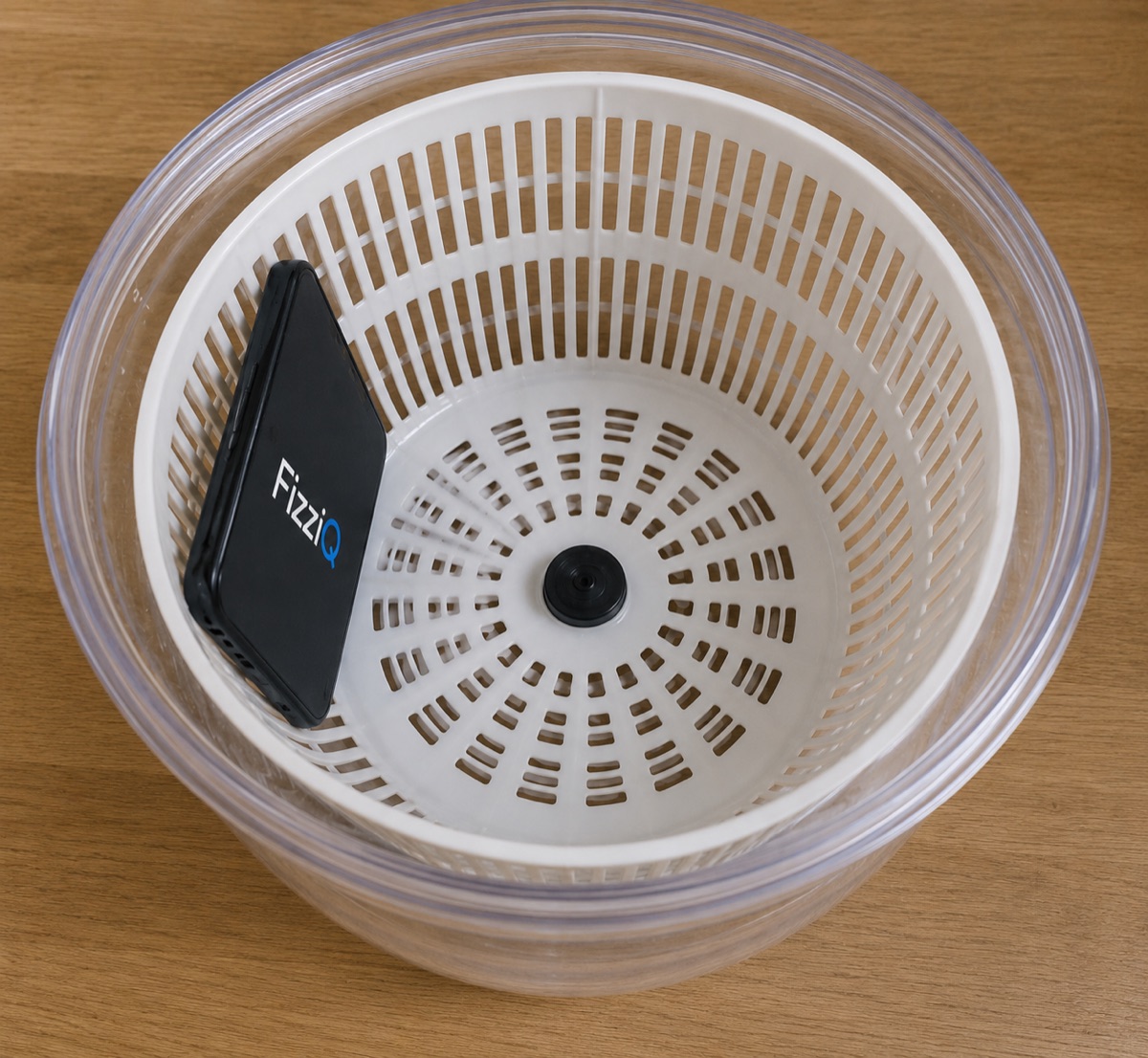 The salad spinner, a test bench for uniform circular motion.
The gyroscope measures angular velocity around three axes, in radians per second. It opens up the whole chapter on rotation: the period of a turntable, conservation of angular momentum on an office chair (the student spreads then pulls in their arms, and the phone in their pocket records the speeding up of the rotation), analysis of a gymnast’s movement.
Combined with the accelerometer, it makes possible one of the finest quantitative verifications at secondary level: place the phone in the basket of a salad spinner and verify the relation a = ω²r between centripetal acceleration, angular velocity and the radius measured with a ruler. Three instruments, one law, a complete verification in twenty minutes.
The microphone: a complete acoustics laboratory
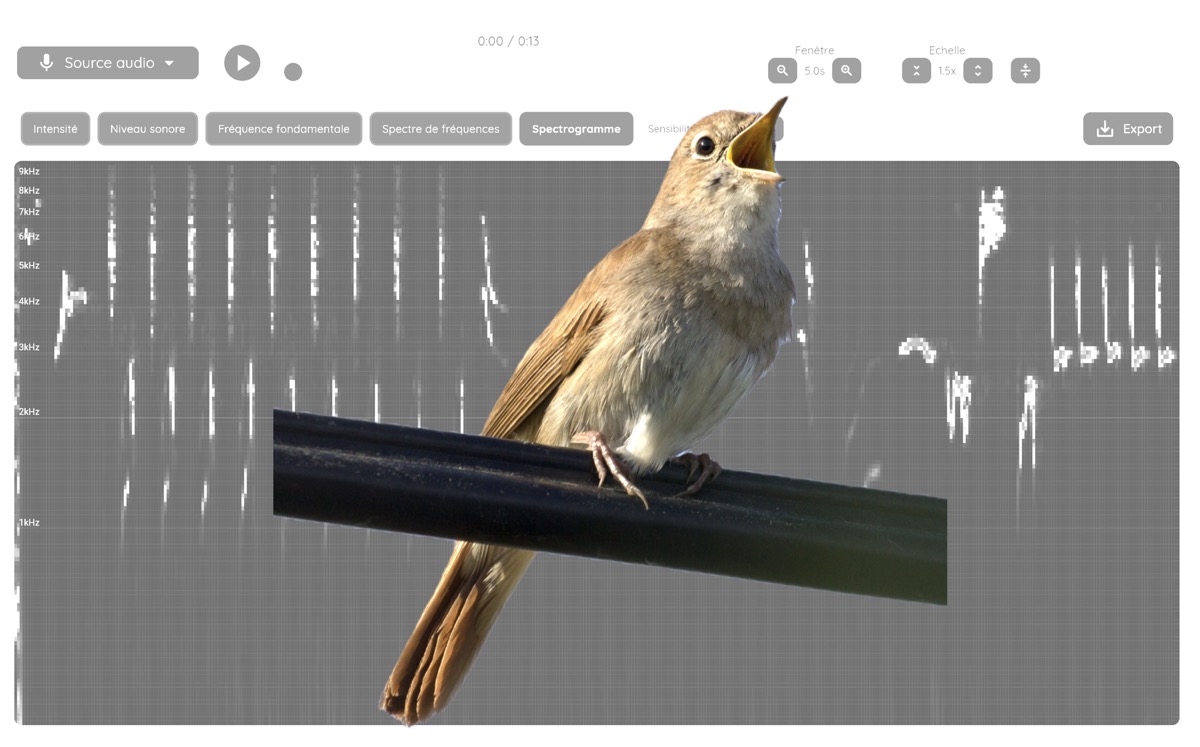 The spectrogram makes frequency, harmonics and a sound’s evolution visible.
With its 44.1 kHz sampling rate, the microphone first of all lets you see the shape of a sound. The oscillogram traces the signal’s amplitude over time: this is the shape of the wave itself, answering the question every student asks — can you see a sound? And this shape is already rich in lessons: a harmonic sound — a musical note, a sung vowel — draws a pattern that repeats identically, period after period, while noise has no regularity at all. The duration of the pattern gives the pitch of the note; its more or less intricate shape hints at the timbre.
To analyse the frequencies contained in a sound, FizziQ offers several complementary tools, from the single dominant frequency to a full time-resolved spectrogram. Discover every measurement available with the microphone in 50 Physics Measures you can do with your smartphone.
These tools open up the most beautiful sound explorations: studying the timbre of a musical instrument, analysing birdsong, discovering why the sound of bells is inharmonic, or unravelling the mystery of the Shepard tone illusion, that scale which seems to rise forever.
The microphone is also a measuring instrument in its own right: as a sound level meter, it measures sound levels in decibels — decay with distance, sound mapping of a school, and a critical-thinking challenge: does adding two sound sources increase the level by 3 decibels? As an acoustic stopwatch, it triggers when a sound passes and measures durations to the millisecond — the key to measuring the speed of sound.
The smartphone is not only a receiver, it is also a sound emitter. Its synthesiser generates precise frequencies — enough to create beats between two neighbouring tones, study interference between two loudspeakers, or test the class’s hearing. It can also play specific sound samples: instrument sounds, noises, various sound effects, useful for studying timbre or triggering measurements. Six protocols in Six experiments with the frequency synthesiser, and a deeper dive in Beats and low-frequency oscillators.
The camera: video analysis, chronophotography and colorimetry
The camera is arguably the richest sensor for teaching mechanics, with three complementary techniques.
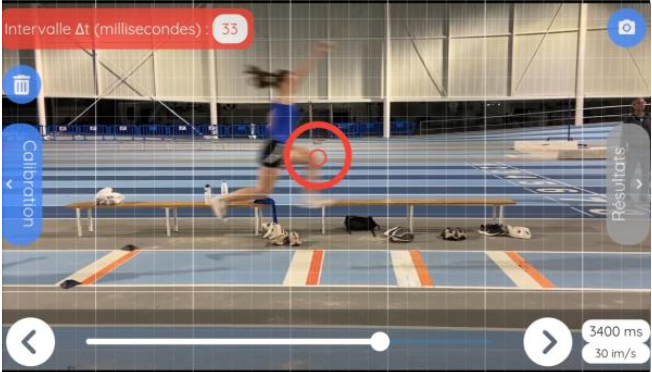 Frame-by-frame tracking, the first step towards velocity and energy curves.
Video analysis (kinematic tracking) is the most quantitative of the three: by marking, frame by frame, the position of a filmed moving object, you obtain curves of position, velocity, acceleration and energy. After calibrating the scale, you can quantitatively verify Newton’s laws, conservation of energy, and the equation of the parabola. It is also the gateway to biomechanics: pole vaulting, free throws, tennis serves. To get started: our complete guide to video analysis and chronophotography, the Kinematics tool user guide, our 7 tips for shooting a good kinematics video and the library of ready-to-use videos.
 Chronophotography makes motion visible before making it calculable.
Chronophotography, heir to the work of Étienne-Jules Marey, superimposes the successive positions of a moving object onto a single image. A falling ball, a projectile launch, a pendulum: the student sees at a glance the trajectory and the changing spacing — and therefore the velocity — without any calculation.
That is what makes it the ideal tool at middle-school level. At that stage, students have neither the vocabulary of kinematics nor the concept of acceleration: they cannot yet describe the dynamics of a motion. Chronophotography sidesteps the obstacle by making the motion visible — balls spaced further and further apart mean acceleration, even before the word exists. Motion becomes visible before becoming calculable: see Using chronophotography in physics practicals.
Colorimetry: analysing red, green and blue intensities turns the camera into a colorimeter — the composition of light, the concentration of a coloured solution — this is the whole point of the Beer-Lambert law activity — or measuring heart rate by photoplethysmography, with a finger placed on the lens. Two articles: How does the colorimeter work? and Why is green light used to measure heart rate?
The magnetometer: exploring magnetic fields
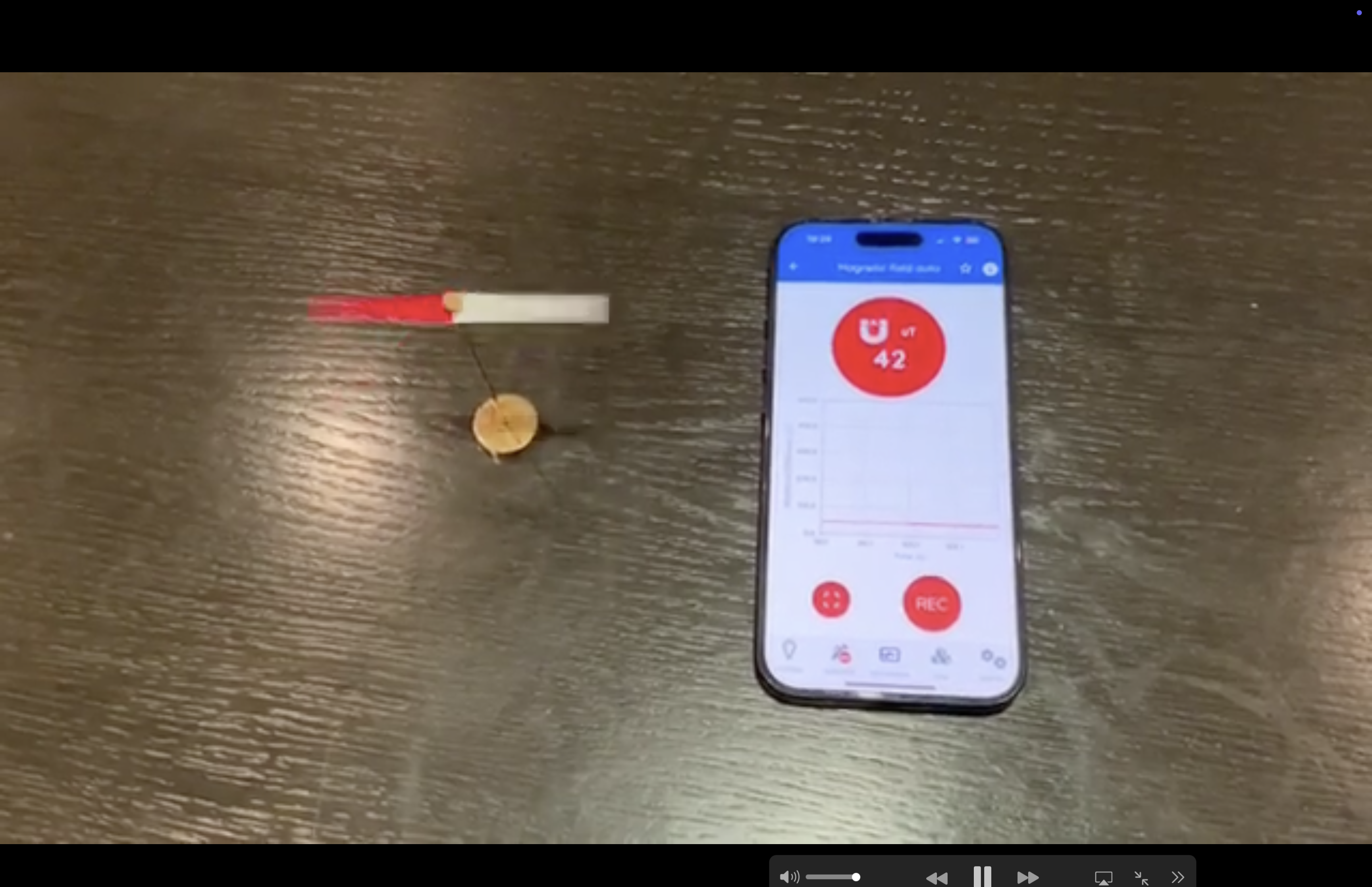 A magnet brought close to the phone: the magnetometer reads the field in microteslas.
Present in every phone for the compass, the magnetometer measures the magnetic field in microteslas along three axes. It can measure the Earth’s field and its inclination, recover the 1/d³ dipole law by moving a magnet away, demonstrate the Oersted effect around a current-carrying wire, or detect the metal structures inside a wall.
A paradox to explore in class: bring a magnet close and the field value goes wild… yet the compass keeps pointing north. Why isn’t a smartphone’s compass affected by magnets? The answer — continuous software recalibration — perfectly illustrates the difference between raw and processed data.
Discover every measurement available with the magnetometer in 50 Physics Measures you can do with your smartphone.
GPS: speed, position and field science
The GPS receiver (more precisely GNSS: GPS, Galileo, GLONASS) provides position, altitude and speed. It can be used to study the motion of a cyclist or a runner, compare instantaneous and average speed, or run scientific mapping projects — geolocated noise or magnetic field measurements. It is also an excellent starting point for talking about relativity: satellite clocks must be corrected for relativistic effects for your position to be accurate.
Discover every measurement available with the GPS in 50 Physics Measures you can do with your smartphone.
Barometer, lux meter and the rest
The barometer detects a one-metre change in altitude: you can measure the height of a building by taking the stairs, or track the weather. The lux meter studies illuminance and its 1/d² decay — on the distinction between photometric quantities, see Luminance or illuminance? Add to these the proximity sensor, the pedometer, and, on recent models, a LiDAR capable of mapping a room in 3D.
Ten landmark experiments, from middle school to university
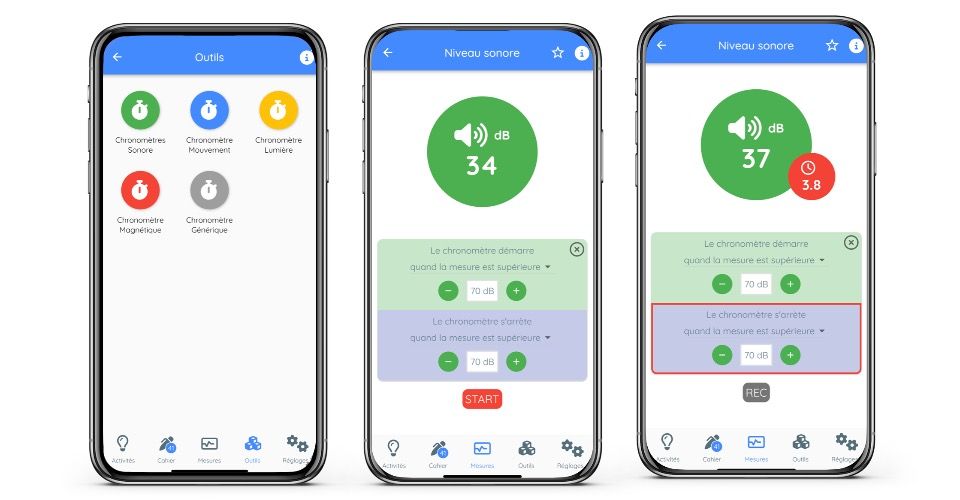 The acoustic stopwatch is sound-triggered: here a threshold set at 70 dB.
Most of these protocols are available as ready-to-use activities in the FizziQ catalogue — and teachers can create their own science experiments with the experiment creator, then share them by QR code.
1. Measuring g by free fall. Film a ball falling in front of a tape measure, or use the acoustic stopwatch: the first sound starts the timer, the impact on the ground stops it. With h = ½gt², a 1 m drop gives t ≈ 0.45 s and g to within a few percent. Seven variants in Seven experiments on gravity.
2. Measuring the speed of sound. Two phones in acoustic stopwatch mode, 10 m apart; a hand clap near the first one: each starts as the wave passes, and the time difference yields the 343 m/s. Seven protocols here, including by echo and by resonance.
3. The pendulum. A phone hanging from a string; the accelerometer or gyroscope records the oscillations. You verify T = 2π√(L/g), measure g by an independent method, and discuss the isochronism so dear to Galileo.
4. The Doppler effect. One phone emits a pure 1,000 Hz tone and spins at the end of a string; a second one measures the received frequency, which oscillates in time with the rotation. Five experiments on the Doppler effect, all the way to exoplanet detection.
5. Measuring the height of a building. The challenge popularised by La Physique Autrement’s Smartphone Physics Challenge, which catalogued 61 methods: barometer, trigonometry with the inclinometer, sound-timed fall, GPS, cast shadow… Ideal for comparing methods and uncertainties.
6. The physics of the lift. Accelerometer in hand, the student records acceleration, cruising and braking, and reconstructs the motion. A concrete introduction to non-inertial reference frames and “apparent weight”, leading straight to Einstein’s equivalence principle.
7. Circular motion with the salad spinner. Verifying a = ω²r by cross-checking accelerometer and gyroscope — one of the favourite experiments of upper-secondary physics teachers.
8. The field of a magnet. The magnetometer measures the field at increasing distances; a log-log plot reveals the −3 slope of the dipole. A fine introduction to modelling.
9. Heart rate by light. Photoplethysmography with the colorimeter: finger on the lens, torch on, and the cardiac signal appears. Physics, biology and connected devices in a single session.
10. Measuring π with sensors. An open challenge: the period of a pendulum, circumference/diameter with GPS, the Monte Carlo method… The best ideas in Measuring Pi with your smartphone.
To go further: 12 famous experiments to recreate with your smartphone, Sport and science: 12 sports to study, 5 biomechanics experiments and 5 mathematics experiments.
Smartphones and school curricula, from primary school to university
| Level | Curriculum themes | Typical smartphone experiments |
|---|---|---|
| Upper primary (ages 8–11, French Cycle 3) | Matter, motion, signals; observing and describing | Sound level in the playground, illuminance, weather and pressure, first chronophotographs — with FizziQ Junior |
| Middle school (ages 11–15, French Cycle 4) | Motion and speed, sound and light signals | Chronophotography of falls and bounces, GPS speed, frequency of a sound, decibels and hearing health |
| Year 10 / Grade 10 (Seconde) | Emission and perception of sound, signals and sensors, straight-line motion | Fundamental frequency and harmonics, sound intensity level, average speed by video analysis |
| Year 11 / Grade 11 (Première) | Circular motion, energy, mechanical waves | Salad spinner (a = ω²r), pendulum energy by video tracking, speed of sound — see our 20 protocols for Years 10–11 |
| Year 12 / Grade 12 (Terminale) | Newton’s laws, free fall and motion in a gravitational field, Doppler effect | Video analysis of a projectile launch, measuring g, Doppler with two phones — the French Ministry of Education (Éduscol) officially suggests this type of activity |
| Higher education (undergraduate, technical institutes, preparatory classes) | Mechanics, acoustics, optics, signal processing | CSV export and Python processing, diffraction, droplet microscopy, grating spectroscopy — see the books Smartphonique (Delabre, Dunod) and La physique avec son téléphone portable (Barillé, Ellipses) |
Which apps for doing physics with a smartphone?
The sensors are in the phone, but it is the software that turns them into instruments. Three families of apps coexist.
FizziQ: the app designed for the classroom
FizziQ is a free app, with no ads and no collection of personal data, developed in France in partnership with the La main à la pâte Foundation and a winner of the French Ministry of Education’s Édu-Up programme. Its distinctive feature: it doesn’t just display sensor values, it structures the entire inquiry process.
Students have access to more than 50 measuring instruments (accelerometer, gyroscope, sound level meter, frequency meter, oscilloscope, spectrogram, magnetometer, lux meter, inclinometer, GPS, colorimeter, acoustic stopwatch, frequency synthesiser…), built-in chronophotography and video analysis tools, and a digital lab notebook — measurements, graphs, photos, LaTeX formulas — exportable as a PDF for assessment. Teachers can create their own protocols and distribute them by QR code, or draw on more than 120 classroom-tested ready-to-use activities. A built-in spreadsheet and a configurable teaching assistant (Ask FizziQ) round out the package. FizziQ also exists as a Web version for computers, a Junior version for primary school, and opens up to external Bluetooth sensors via FizziQ Connect.
Phyphox and Physics Toolbox: raw access to the sensors
Phyphox, developed by RWTH Aachen University, is an international benchmark, particularly suited to upper secondary and higher education: direct, finely configurable access to raw data, clever preconfigured experiments (pendulum, sonar, free fall), remote control from a browser. Physics Toolbox Sensor Suite, widely used in the English-speaking world, takes a similar approach with CSV export.
These apps are complementary to FizziQ rather than competitors: where they excel at technical access to the data, FizziQ adds the pedagogical layer — lab notebook, distributable protocols, guided activities — that makes managing a whole class easier. Indeed, La Physique Autrement (Université Paris-Saclay) recommends both: Phyphox “more for upper secondary or higher education”, FizziQ “more for middle and upper secondary”.
For an external, well-documented perspective, the article The FizziQ ecosystem as a pocket laboratory in physics education, published in Physics Education in 2026 by Mustafa Ergun and Ulysse Delabre, analyses the FizziQ ecosystem and its place in experimental teaching. On our side, we offer a hands-on review in FizziQ put to the test.
Specialised apps
For occasional uses: sound level meters and spectrum analysers (Decibel X, Spectroid), compass and teslameter apps, video analysis tools (Vernier Video Physics, Kinovea on computer), or simple sensor viewers (Sensor Kinetics, AndroSensor) displaying raw data streams. They can serve as a second measurement to cross-check results, but their fragmented use — one app per quantity — and the frequent presence of ads make them less suited to the classroom than an integrated, tracker-free app.
Making your classroom sessions a success: practical tips
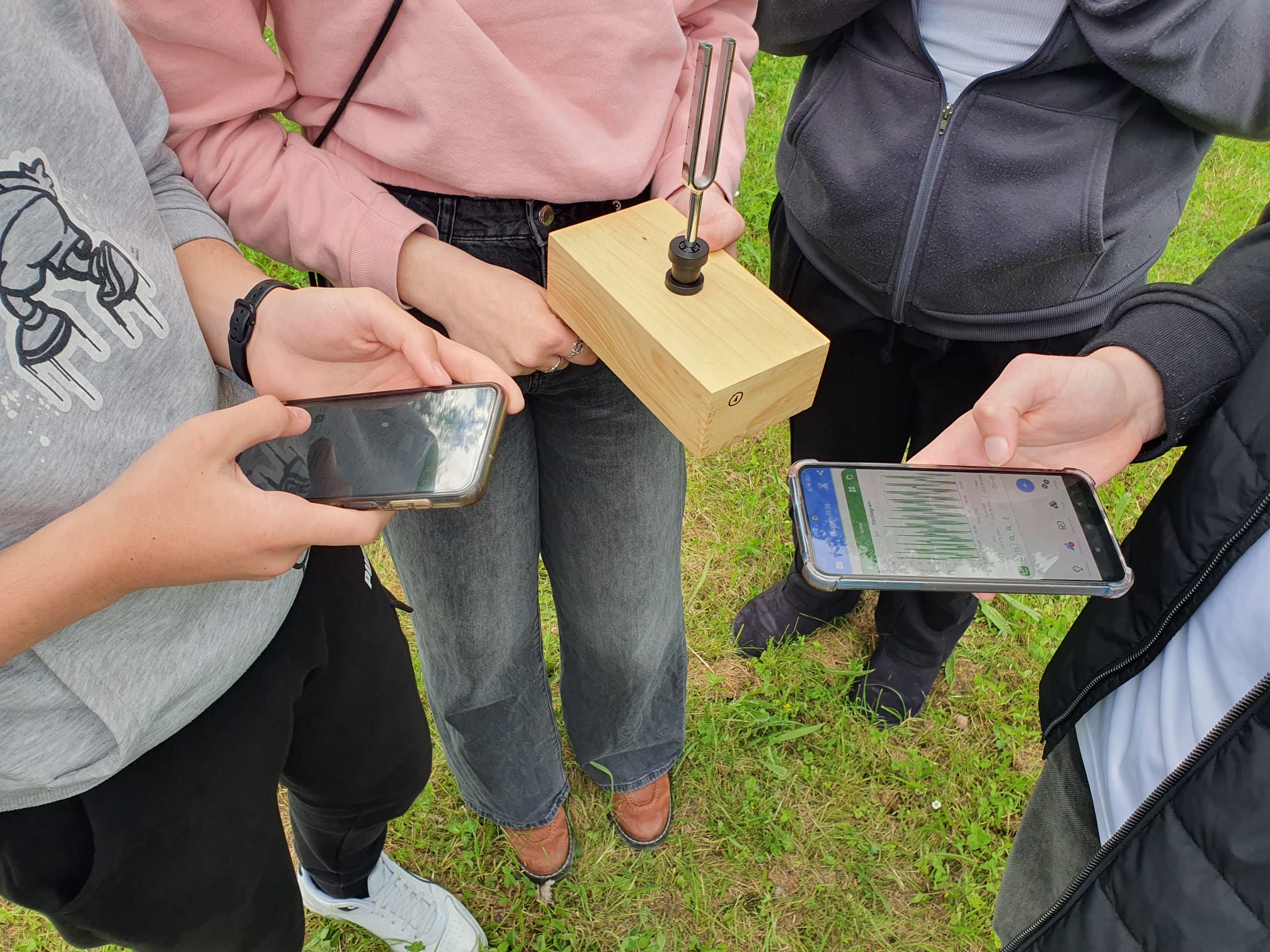 A tuning fork, two smartphones: the measurement passes from hand to hand.
Set clear rules for phone use. The rule that works: during the session, the phone is a measuring instrument and nothing else. Announce the framework at the start of the lesson, use airplane mode (all sensors work without a connection), work in pairs — one operator, one recorder. Our field-tested advice: Our tips for using FizziQ in class and the step-by-step tutorial Your first inquiry session with FizziQ.
Turn heterogeneity into an asset. Not all phones have the same sensors or the same performance: this is a pedagogical opportunity. Comparing the values of g obtained by ten devices means talking concretely about dispersion, mean, standard deviation and uncertainty — abstract notions that suddenly become tangible.
Develop critical thinking about the sensor. A measurement is not a truth: the sound level meter is not Class 1 calibrated, GPS drifts indoors, the magnetometer is constantly recalibrated. Identifying the limitations of one’s instrument is one of the most valuable lessons of smartphone physics.
And if smartphones are banned in your school? Restrictions on phone use in middle schools, extended to upper secondary, do not rule out digital experimentation: the same measurements can be made on the school’s tablets, on computers with FizziQ Web (which adds simulations, a spectrogram and Python), or with external sensors via FizziQ Connect. Many schools also allow supervised educational exceptions, with phones handed out and collected at the start and end of the practical session. The full picture in our article on alternatives to the smartphone ban.
In summary
Doing physics with a smartphone means turning an everyday object into a scientific instrument: measuring an acceleration, timing a sound to the millisecond, analysing a motion frame by frame, mapping a magnetic field, tracking your heart rate with a camera. It means covering a large part of the curriculum from primary school to university with no budget and no extra equipment. Above all, it means giving back to every student the founding gesture of science: measuring for yourself, doubting, trying again, concluding.
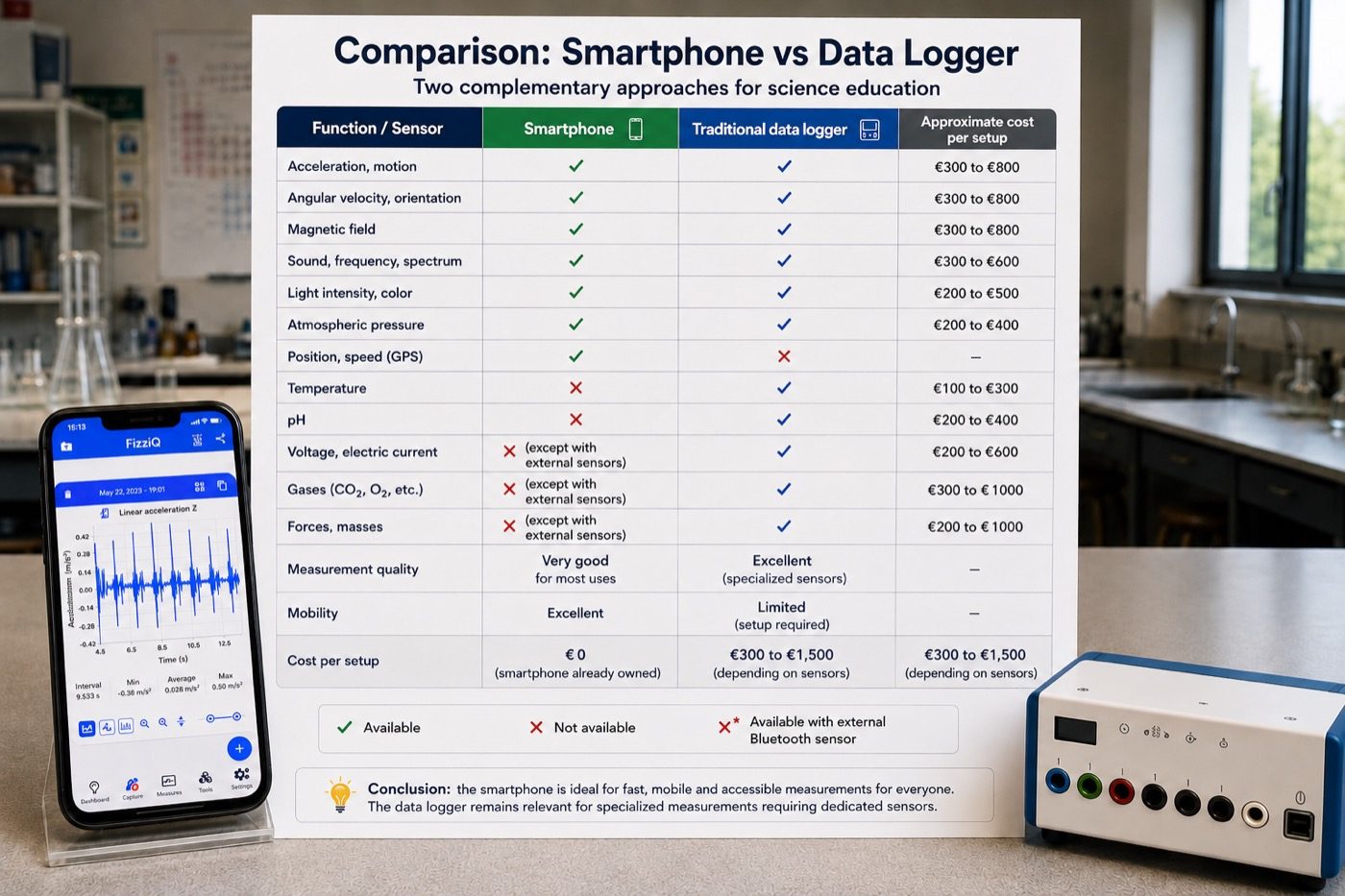 The smartphone covers the essentials of secondary-school physics measurements for free.
🚀 Get started today
Download FizziQ on iOS or on Android for free, try FizziQ Web on a computer, and explore the library of more than 120 activities.
FAQ
Can you really make precise measurements with a smartphone? Yes. Smartphone MEMS sensors are industrial-grade: the accelerometer can measure g to better than 1%, the microphone measures frequencies to within a hertz, and publications in the American Journal of Physics have validated these sensors for university practicals.
What is the best free app for doing physics with a smartphone? FizziQ (middle and upper secondary, a complete inquiry-based approach with more than 50 instruments and a lab notebook) and Phyphox (upper secondary and higher education, configurable access to raw data) are the two free reference apps. Physics Toolbox is the main English-language alternative.
Do all smartphones have the same sensors? No. The accelerometer, gyroscope, magnetometer, microphone, camera and GPS are present on almost all models; the barometer and LiDAR only on some. An app like FizziQ automatically detects the available sensors.
Android or iPhone: which should you choose for physics? Both work. The sensors are of equivalent quality, and both FizziQ and Phyphox run identically on the two systems. The only notable difference: data access varies slightly between models — which, incidentally, fuels good discussions about comparing instruments.
Can you use a tablet instead of a smartphone? Yes. Tablets carry most of the same sensors (often without a barometer or GPS on Wi-Fi-only models) and are frequently preferred in class, as they belong to the school.
Do students need the Internet to use the sensors? No. All the sensors work in airplane mode. Only GPS needs to pick up satellites — but no mobile network. Measurements can therefore be made offline, which also simplifies classroom management.
What physics experiments can you do with no equipment at all? Measure the speed of sound with two phones, study free fall by chronophotography, analyse the spectrum of your voice, measure the Earth’s magnetic field, record the acceleration of a lift, or measure your heart rate with the camera.
What can’t a smartphone measure? Air temperature, electrical voltage and current, pH and radioactivity are not accessible to the internal sensors. For these quantities, you connect external Bluetooth sensors, for example with FizziQ Connect.
What if smartphones are banned in my school? The same measurements can be made on tablets, on a computer with FizziQ Web, or with external Bluetooth sensors. Many schools also grant supervised educational exceptions for practical sessions.
From what age can children do science with a smartphone or tablet? From around age 8 (upper primary) with simple measurements of sound, light or weather, for example with FizziQ Junior, designed with the La main à la pâte Foundation for ages 7–12.
Further reading: this article is part of our complete guide to measuring and analyzing sound with a smartphone or computer.