
FizziQ Web: physics on the big screen
FizziQ Web is a desktop alternative to the mobile app. It offers similar features, but with some differences since computers don't have sensors. However, for certain areas, such as acoustic analysis, FizziQ Web allows for more advanced analysis than the mobile version.
FizziQWeb is easy to use, no installation is required: simply open a browser and type https://fizziqweb.web.app

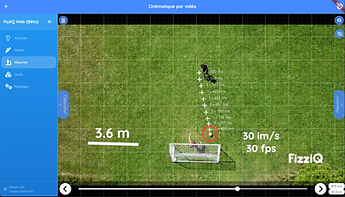
Kinematics made even easier
Kinematic analysis is one of the most used features on FizziQ. FizziQ Web incorporates the complete video analysis that made it successful on mobile devices: import of videos (many formats) or chronophotographs, point-by-point tracking with the mouse to automatically calculate positions, speeds, accelerations, analyze rotations and determine kinetic and potential energies, analysis in the experiment notebook and easy export and sharing of data.
The use of a computer mouse and a large screen make analysis even easier , and of course, there is always access to the vast library of videos and chronophotographs.
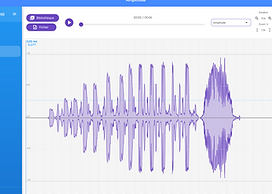
Augmented audio analysis
In FizziQ Web, it is no longer the microphone that captures sounds but rather the sound files easily accessible on a computer.
We took the opportunity to beef up FizziQ Web's audio analyzer by adding new analysis features like the spectrogram or the min/max display for the oscillogram. Furthermore, the large screen makes it easier to analyze and move around the file.
The user always has access to the FizziQ sound library which facilitates access to resources and of course the student can download other files according to his teaching.
FizziQ Web provides an easy approach to the discipline of acoustics for middle and high school students.
Simulations to understand complex phenomena

FizziQ Web also allows users to explore interactive scientific simulations that complement real experiments. These simulations make it possible to study phenomena that are difficult to reproduce in the classroom or that require special conditions.
Students can adjust parameters, observe effects in real time, and test hypotheses without any risk to equipment. This approach supports the understanding of physical laws by linking observation and modeling.
Simulations are directly integrated into the lab notebook: users can record screenshots, analyze results, and compare simulation data with results from real experiments.
This combination of experimentation and simulation helps students build a deeper understanding of scientific phenomena.
Expanding the laboratory with external sensors
Although computers do not include built-in sensors like smartphones, FizziQ Web can connect to a wide range of external sensors.
Using Bluetooth connections, it is possible to connect microcontrollers such as Arduino, micro:bit, or ESP32, or dedicated devices such as FizziQ Connect, to perform a wide variety of scientific measurements: temperature, pressure, light intensity, CO₂ concentration, distance, electrical voltage, and many more.
This functionality transforms FizziQ Web into a true computer-based data acquisition platform, accessible and flexible.
Teachers can design customized experiments, integrate specific sensors, and develop more advanced scientific or technological projects.

A scientific spreadsheet for data analysis

The built-in spreadsheet in FizziQ Web allows users to quickly analyze experimental data without needing external software.
Students can create data tables, use mathematical or statistical formulas, and automatically generate graphs adapted to their measurements. Curve fitting (linear, quadratic, exponential, etc.) helps students study relationships between physical quantities.
Results can then be inserted directly into the lab notebook, making it easier to write clear scientific reports.
The spreadsheet also allows exporting data to formats such as Excel (CSV), PDF, or Python, making it easy to continue analysis or share results.
This direct integration of spreadsheet tools makes scientific analysis smoother and more accessible for students.
The digital notebook
FizziQ Web simplifies scientific document management through a flexible and easy-to-use system.
Students can easily import videos, images, audio files, or experimental data directly from their computer. All elements can be organized in the lab notebook, enriched with annotations, and structured like a real scientific report.
Sharing is simple: projects can be exported in multiple formats (PDF, CSV/Excel, Python, or image) or exchanged between FizziQ devices. This compatibility makes it easy to move from smartphone to computer and back again.
All files are stored locally, with no mandatory account required, ensuring student data privacy and confidentiality.


A web address and presto!
FizziQ Web focuses on simplicity: no installation required, just open a browser and go to https://fizziqweb.web.app . This approach bypasses the IT constraints of institutions (installation rights, updates, locked images) and reduces the preparation on the teacher's part to... sharing a link.
Updates are automatic on the server side: everyone always uses the latest version, without any manipulation.
The webapp is cross-platform and works on most browsers (Chrome, Safari, Firefox, Opera), ensuring the same experience in the classroom as at home.
And, like FizziQ mobile apps, the tool remains free and privacy-friendly (no personal data collection).